
A window tint visualizer for tint shops, on your own website.
3D Cars Studio is a 3D window tint visualizer that runs on a tint shop's own website and on a touchscreen at the front desk. It is for shop owners who want customers to see the shade on every window of their own car, then book with the shop instead of a film brand.
Every window, its own shade
Windshield, fronts, rears and sunroof, each set on its own across seven film stops.
Clear glass first
A clear-glass preview shows the car with no film, so films compare fairly.
Four kinds of light
Shade, Indoors, Showroom and Direct Sun. Film reads differently in each.
Factory glass counted
It accounts for how dark each vehicle's glass already is from the factory.
What is a window tint visualizer, and why does a shop need one?
A window tint visualizer shows a customer what film will look like on a car before anyone cuts it. Instead of a sample card held up to the glass, the customer picks a vehicle and a shade, and sees the result.
A number on a card does not tell a customer much, so they say "let me think about it" and leave. A visualizer answers them while they are still deciding: at your counter, or at home on your website. Some people call it a 3D window tint simulator. Same idea.
Why put it on your own site instead of sending customers to a film brand's tool?
Film manufacturers run their own simulators. LLumar, for example, points customers to its own Window Tint and Paint Protection Film Simulator and to a dealer locator. The customer plays with shades on the manufacturer's site, then gets a list of dealers. Your shop is one name on that list, if it is there at all.
When the visualizer runs on your domain, the customer stays on your site. It carries your brand, with no vendor logo, and every quote request goes to your inbox. There is a longer breakdown in how 3D Cars Studio compares with film-brand simulators.
How does it handle a different shade on each window?
Few jobs are one shade all round. The studio sets the windshield, the front windows, the rear windows and the sunroof separately. Each one moves through seven film stops, from 70% down to 5%, plus factory glass. The car on screen matches the job you are about to write up, window by window.
Will the customer compare films fairly?
Three things get in the way. First, the glass. Many vehicles leave the factory with darker glass in the back. The studio accounts for each vehicle's factory glass darkness, so the result starts from the glass the car actually has.
Second, the eye. After a minute on a dark film, everything looks light. The clear-glass preview toggle shows the car with no film, so each option is judged against the same untinted car.
Third, the light. The studio has four lighting environments: Shade, Indoors, Showroom and Direct Sun. A film that looks right under shop lights can look different at noon outside.
Which vehicles can customers pick?
The public demo runs a Tesla Model Y (2025), a Tesla Model 3 (2025) and a Mercedes-Benz S-Class. Your build adds the vehicles your customers drive, and more can be added later. You can try the live demo on all three cars right now.
Which kind of tint visualizer should a shop use?
Four common approaches, side by side.
| What matters | Photo-upload AI tool | 2D image swapper | Film-brand simulator | 3D on your own domain |
|---|---|---|---|---|
| How it works | AI edits photos of the customer's car | Swaps a flat picture of a car for a darker one | The manufacturer's own preview tool | A 3D car the customer turns and sets |
| What the customer needs | Clear photos from several angles | Nothing | Nothing | Nothing. No app, no login |
| The view | Whatever the photo caught | One fixed picture | Set by the brand | Four lighting environments, any side of the car |
| Where it runs | The vendor's tool | Your site | The manufacturer's site | Your domain and your counter |
| Where the lead goes | Depends on the vendor | Your site's contact form | A dealer locator | Your inbox |
Photo-upload tools depend on the customer's photos. A 2D swapper is one flat picture that gets darker. Film-brand simulators end at someone else's dealer list. Only a 3D studio on your domain lets the customer turn their car, set each window and send the request to you.
Yours, not a platform's.
It runs on your domain in your brand, and every quote request lands in your inbox.
The yes, faster.
The customer sees the shade on their own car before they leave the counter.
Own it, or subscribe.
A one-time lifetime license with no monthly fee, or a one-time activation plus a flat monthly plan. No per-lead fee on either.
What about customers who walk in?
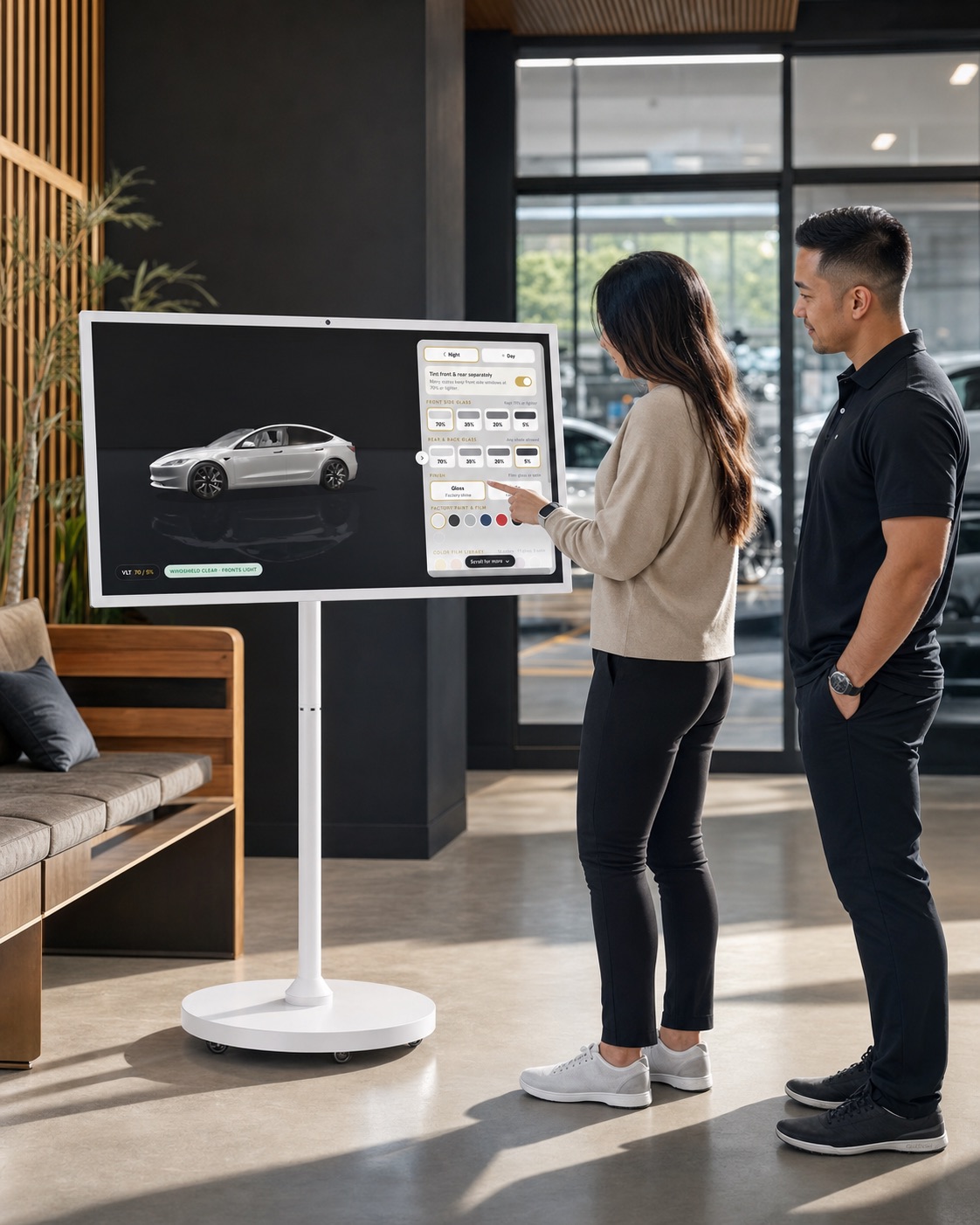
Every build includes a touchscreen on a rolling stand, preloaded with your studio. It shows an attract screen when nobody is using it and resets itself when a customer walks away.
The same studio runs on your website, so a customer who starts at your counter can continue at home.
How does it get onto my website?
Your web person adds it in one line as an iframe, or hosts it as static files on your own domain. It works with WordPress, Squarespace, Wix, Webflow and custom sites, and runs in any modern browser with no app or login.
If an agency runs your site, they can drop it in for you. See how it works for agencies that build tint shop websites.
How fast is it live, and what does it cost?
It is live in 24 to 48 hours after you sign off on the look. There are two ways to pay: a one-time lifetime license with no monthly fee, or a one-time activation plus a flat monthly plan. There is no per-lead fee on either. We quote the number on a 20-minute call, after you have seen the studio running on your own vehicles. The details are on the 3D Cars Studio pricing page.
Launch offer: the website upgrade is free for the first 50 shops that book.
What else do shop owners ask?
Is a window tint visualizer the same as a tint simulator?
Yes. Shops and customers use both names for the same thing: a tool that shows what film will look like on a car before it goes on. 3D Cars Studio does it in 3D, on your own website.
Do customers need to download an app or make an account?
No. It runs in any modern browser, on a phone, a laptop or the touchscreen at your counter. No app and no login.
Can customers set a different shade on each window?
Yes. The windshield, front windows, rear windows and sunroof are set separately, each across seven film stops from 70% down to 5%, plus factory glass.
Where do the quote requests go?
To your inbox. Not to a platform and not to a film brand. There is no per-lead fee.
Does it show paint protection film too?
Yes. The same studio shows 18 color PPF films in gloss and satin as a full-body wrap over the factory paint, plus clear and stealth finishes.
Related
See it on your customers' cars.
Twenty minutes on a call. We show the studio running on the vehicles your customers drive, then quote the number.